
Guide · KYC
Why users drop off at ID verification
Published estimates say between 25% and 60% of people leave during identity verification, depending on the market and the checks involved. Most of them did not decide against verifying. One screen confused them.
Where people leave
A few steps lose most people: taking the ID photo, the selfie or liveness check, and waiting for the result. Your own funnel shows which step is yours.
Analytics tells you where. It does not tell you why. The causes below explain most of the why, and each one maps to a usability principle.
What the research says
| Finding | Figure | Source |
|---|---|---|
| Digital bank accounts abandoned before completion | Up to 60% | UserTesting research (year not stated) |
| Abandonment at KYC, industry range | 25% to 60%+ | Vendor FAQ |
| Conversion lost when an ID upload is required | 29% drop | Industry data (year not stated) |
| Applicants who quit because they had to share too much personal data | 21% of those who quit | Signicat, "Battle to Onboard" |
| Step completion with active vs passive liveness | About 63% vs 99.9% | Innovatrics, one production deployment |
| Drop-off after the flow moved into the bank's own interface | 48% down to 30% | One European banking project, not a controlled study |
These figures come from my KYC research notes, compiled on 30 October 2026 from public vendor and research pages. Year and sample size are often missing, so treat them as directional. The sources are listed at the end.
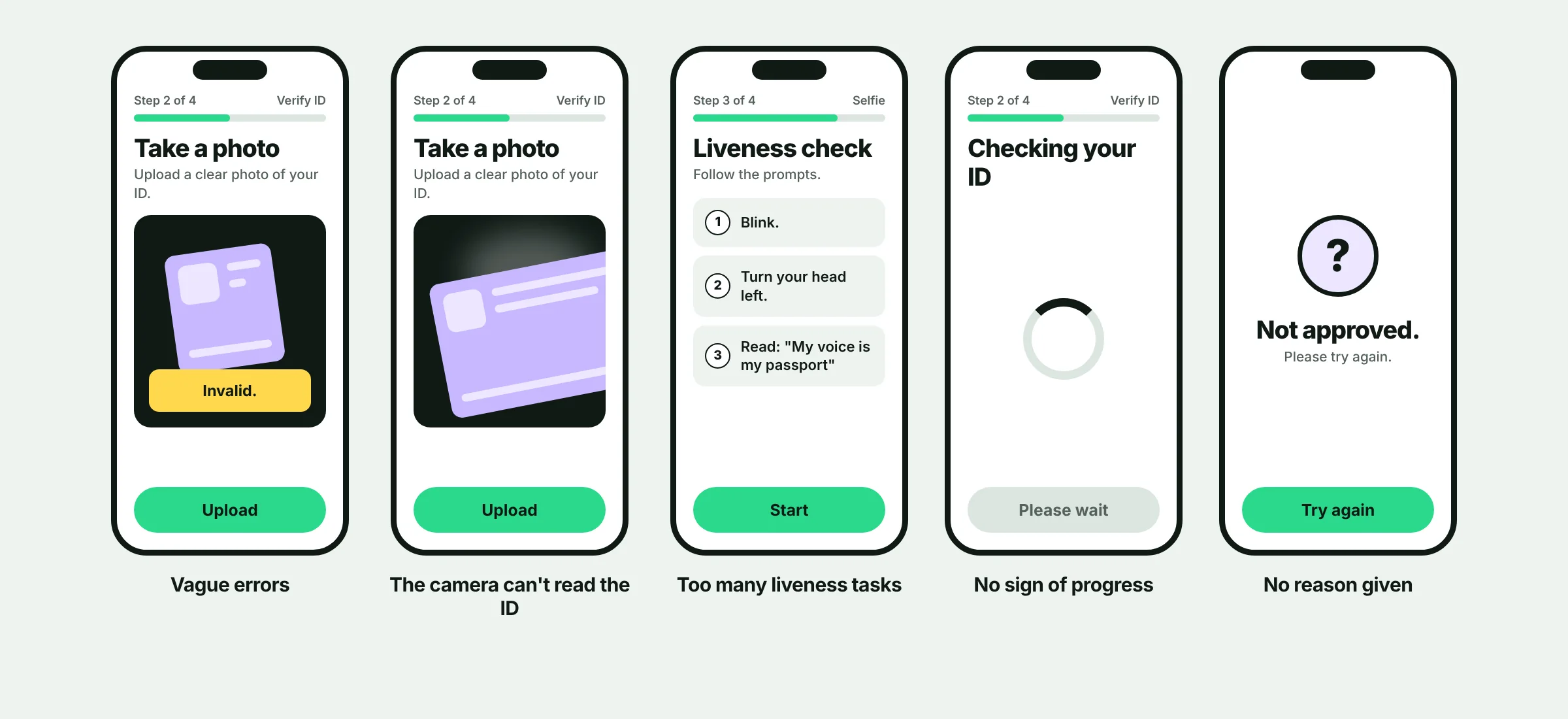
1Vague errors
The screen says "Invalid." or "Upload failed." The user cannot tell what to change, so they try the same thing again, or give up.
Fix: Say what went wrong and how to fix it: "The photo is blurry. Hold your phone steady and try again."
Principle: Help users recognize, diagnose and recover from errors: use plain language, name the specific problem, do not blame the user and keep what they typed.
2The camera cannot read the ID
There is no frame to line the card up with, the light is bad, or the document is an unusual type. The user retakes the photo again and again.
Fix: Show a framing guide, give live hints about light and glare, capture automatically when the card is in focus, and let people upload a file as a backup.
Principle: Error prevention and visibility of system status: a guide and live hints stop the bad photo before it happens, instead of reporting it afterwards.
3Too many liveness tasks
"Blink. Turn your head. Read this phrase." Every action is another place to fail, and some people cannot do them easily. In one vendor's production deployment, step completion was about 63% with active liveness tasks and 99.9% with passive liveness (Innovatrics, one deployment, so directional).
Fix: Ask for the fewest actions your risk model allows. Explain each one in a line before the camera starts, and offer another way for people who cannot do it.
Principle: User control and flexibility : ask for as little as you need, and always leave people another route.
4No sign of progress
The user cannot tell how many steps are left, or whether the check is still running. A spinner with no end looks like a crash.
Fix: Show a step count and an estimated wait. If the result takes a while, say how they will hear back, and let them leave and return.
Principle: Visibility of system status. About 0.1 seconds feels instant, 1 second keeps the user's flow, and around 10 seconds is the limit of attention. A looping animation is enough for short waits, percent-done is better from about 10 seconds, and a status tracker suits waits of minutes or hours.
5A rejection with no reason
"Not approved." and a Try again button. The user does not know what to change, so they leave or write to support.
Fix: Give a plain reason where you can, say what to change, keep their progress on retry and offer a way to reach a person. The guide on explaining AI rejections goes deeper.
Principle: Help users recover from errors, and give them control: a reason, a way to fix it and a way out.
Five more causes from the research
Camera or location prompts with no reason
Explain why you need access, at the moment you need it. People are more likely to grant a permission when they are told why, even when the reason is simple.
A redirect to a third-party page
When the look changes, people think something broke and close the page. In one European bank, drop-off fell from 48% to 30% after the flow moved into the bank's own interface (one project, not a controlled study). Keep the look and wording consistent.
Approvals that are later reversed
A success message that is reversed later looks like a malfunction and forces people to start again. Show success only when the result is final, and say "pending" until then.
Asking for too much
Of the applicants who quit, 21% said they had to share too much personal data (Signicat). Ask only for what you need, and say why.
Gaps in accessibility
Face checks reject people with disabilities more often, and a passport fallback fails people whose hands shake. Test with these users and offer another route.
How to find your worst step
- 01
Map the steps
List every screen from signup to verified.
- 02
Count who reaches each step
Your analytics shows where the biggest drop is.
- 03
Watch real people
Watch about five people go through that step, in tests or session recordings, to see why they leave.
- 04
Rate what you find
Mark each problem High, Medium or Low by how often it happens, how much it hurts and whether it lasts.
- 05
Fix one thing, then measure
Track completion rate, retries per capture and time to verify, before and after each change.
Fewer drop-offs, same controls
Reducing friction must not weaken your checks. Some steps have to stay. Ask your compliance team which ones before you change a flow, then make those steps as clear as they can be.
Related
Find out where your users drop off.
Start with a 5-day onboarding audit. You'll get a clear map of what's losing users and what to fix first.
Onboarding & KYC audit
- Flow review and drop-off map
- Prioritized fix list
- 30-minute walkthrough call